What This Guide Helps With
This guide explains how to check for hidden power surge damage after a storm or power outage, which devices are most at risk, and how to protect your home’s electronics and appliances before the next outage hits.
Quick Answer
Power surges most often happen when service is restored after an outage or when lightning strikes a nearby line, sending a brief spike of voltage far above normal through your home’s wiring. Any device left plugged in during a storm or outage — TVs, computers, refrigerators, garage door openers, HVAC control boards — can be damaged instantly or degraded over time by repeated smaller surges you never notice. A whole-home surge protector installed at your electrical panel, combined with point-of-use surge protectors on major electronics, is the most reliable defense.
Safety First
- If you smell burning, see scorch marks, or notice an outlet is warm to the touch after a storm, stop using it and call an electrician before plugging anything back in.
- Do not touch any device that was struck by a surge and shows visible damage, melted plastic, or exposed wiring.
- If your electrical panel shows scorch marks, a burning smell, or a breaker that will not reset after a suspected surge, treat this as an electrical emergency — see our breaker panel warning signs guide.
What to Do First (After a Suspected Surge)
- Check obviously sensitive electronics first — computers, routers, smart TVs, and anything with a digital display. A device that won’t power on, resets to factory settings, or behaves erratically may have taken surge damage.
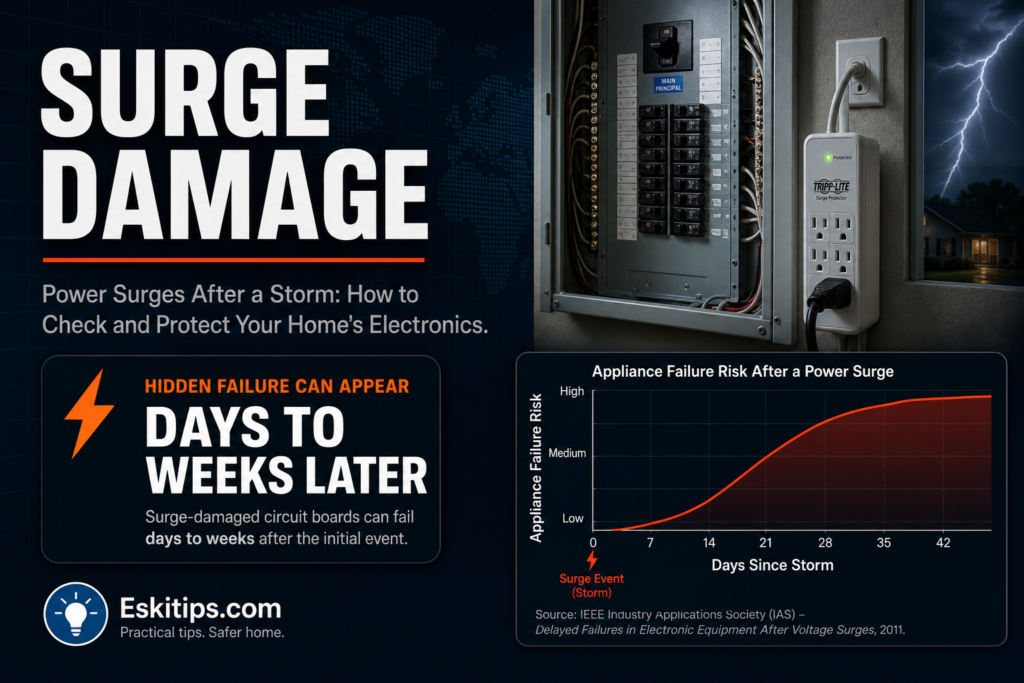
- Test major appliances one at a time, especially the refrigerator, HVAC system, and washer/dryer — many have circuit boards that fail silently after a surge and only show symptoms days or weeks later.
- Check your garage door opener — surge damage commonly affects the logic board, causing it to stop responding to remotes even though it still powers on.
- Inspect any surge protectors you were using — most have an indicator light showing whether protection is still active. A surge protector that absorbed a hit may still pass power but no longer protect against the next one.
- Reset breakers carefully if any tripped during the event, and watch for one that trips again immediately — that points to a fault on that circuit rather than a normal overload.
What Not to Do
- Do not assume a device is fine just because it powers on — some surge damage causes gradual failure over weeks, not immediate shutdown.
- Do not reuse a surge protector after a major hit without checking its indicator light or replacing it — many only protect once.
- Do not plug sensitive electronics directly into the wall “temporarily” while waiting to buy a new surge protector during storm season.
- Do not ignore a breaker that trips repeatedly after a storm — this can indicate hidden wiring damage, not just a coincidence.
What Gets Damaged and What It Looks Like
| Device or system | Common surge symptom | What to do |
|---|---|---|
| Computers, routers, smart TVs | Won’t power on, resets to defaults, Wi-Fi or ports stop working | Test on a different outlet; replace if damage is confirmed |
| Refrigerator or HVAC control board | Unit runs erratically, wrong temperature, delayed failure days later | Monitor closely; call an appliance or HVAC technician if symptoms appear |
| Garage door opener | Powers on but won’t respond to remote or keypad | Check logic board reset procedure; replace opener if unresponsive |
| Outlet stops working but breaker is fine | Localized surge damage to that outlet or its wiring | Stop using it; have an electrician inspect the circuit |
| Repeated breaker trips after a storm | Wiring insulation damage from a large surge | Call an electrician rather than repeatedly resetting |
Safe DIY Checks
- Check the indicator light on every surge protector in the house after a storm — a dark or red light usually means it’s no longer protecting anything.
- Test each major appliance’s basic function individually rather than assuming the whole house is fine because the lights work.
- Look at your electrical panel for any new scorch marks, discoloration, or smell after a lightning-heavy storm.
- Check smart home devices and thermostats — these often show corrupted settings or a blank screen as the first visible surge symptom.
When to Call a Professional
Call a licensed electrician if:
- A breaker trips repeatedly after resetting, or won’t reset at all.
- You see scorch marks, smell burning, or feel heat at an outlet, switch, or the panel itself.
- You want a whole-home surge protector installed at the panel — this is an electrical panel modification and should not be attempted as a DIY project.
Call an appliance or HVAC technician if a major appliance behaves erratically after a storm, even if it still technically runs — early diagnosis can prevent a full board replacement later.
Prevention Tips
- Install a whole-home surge protector at your electrical panel — this is the single most effective step, since it protects everything downstream at once.
- Use point-of-use surge protectors (not just power strips) for computers, TVs, and other sensitive electronics, and replace them every few years or after any major hit.
- Unplug the most sensitive and expensive electronics before a forecast severe storm if you don’t have whole-home protection yet.
- Keep your homeowner’s insurance documentation of electronics and appliances updated — see our documentation checklist for the same principle applied to storm damage generally.
Recommended Next Step
After any storm with lightning or a power outage with a hard restoration, walk through the house and test sensitive electronics and major appliances one at a time rather than assuming everything is fine. If you don’t already have whole-home surge protection installed at your panel, this is worth scheduling with an electrician before the next storm season, not after the next expensive device fails.
Related Guides
- Circuit Breaker Panel Buzzing or Humming: What It Means
- Outlet Not Working but Breaker Not Tripped: What to Check
- Summer Storm Damage: What to Inspect After a Storm
Frequently Asked Questions
How do I know if my surge protector actually worked?
Most surge protectors have an indicator light that turns off or changes color once the protection component has absorbed a significant hit. A protector can still pass electricity through with no protection left, so check the light rather than assuming it works because devices still power on.
Can a power surge damage something without it failing right away?
Yes. Circuit boards in appliances, HVAC systems, and electronics can sustain partial damage that causes gradual, delayed failure over days or weeks rather than an immediate shutdown. This is why it’s worth monitoring major systems for a couple of weeks after any storm with lightning or a hard power restoration.
Is a power strip the same as a surge protector?
No. A basic power strip only adds outlets and does not protect against voltage spikes. Look for a surge protector specifically rated in joules of protection, and replace it after any major surge event since most designs only protect once against a large hit.