What This Guide Helps With
This guide explains why a smart lock or video doorbell stops responding, loses connection, or won’t lock and unlock properly, the safe checks to do before assuming the device has failed, and when to contact the manufacturer versus a locksmith or electrician.
Quick Answer
A smart lock or video doorbell that stops working most commonly has one of these causes: dead or low batteries, a lost Wi-Fi connection, a firmware update stuck mid-process, or physical misalignment of the lock’s bolt or the doorbell’s mounting bracket. Devices that lose Wi-Fi after a router change, an internet outage, or a summer storm are one of the most common causes of a smart device suddenly appearing “offline” in its app even though the hardware itself is fine.
Safety First
- If a smart lock fails and you’re locked out, do not force the mechanism — most smart locks have a physical key override; locate and test yours before you actually need it in an emergency.
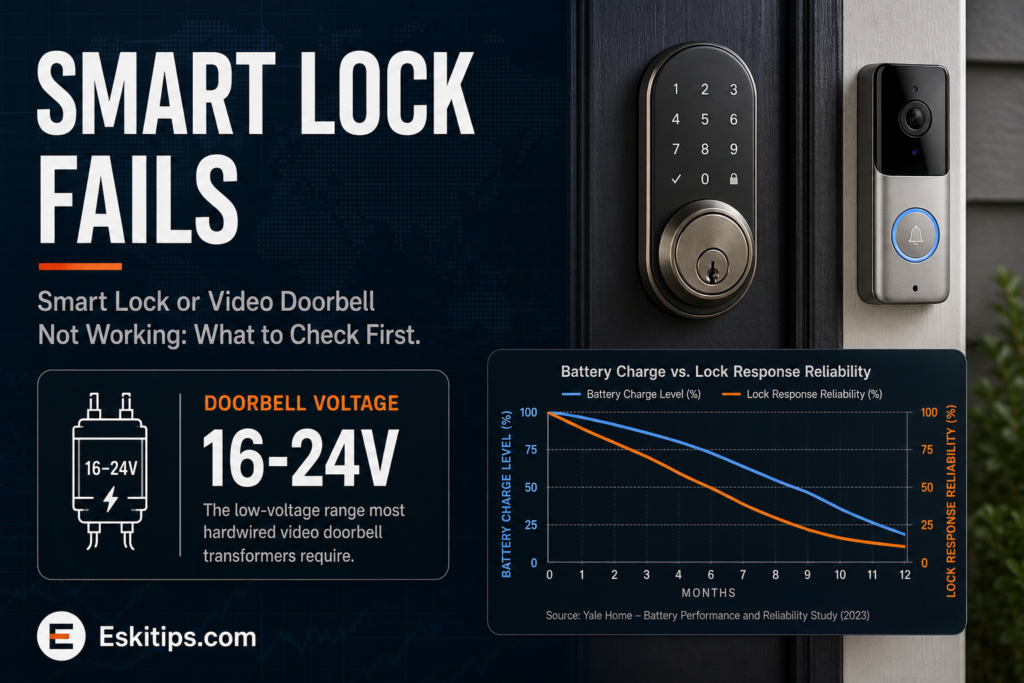
- Never wire a hardwired video doorbell yourself without confirming the correct transformer voltage — most doorbells require low-voltage wiring (16-24V), and connecting to standard household voltage can damage the unit or create a shock hazard.
- If you smell burning or see scorch marks near a hardwired doorbell’s wiring, stop and call an electrician before continuing to troubleshoot.
What to Do First
- Check the batteries first on any battery-powered smart lock or doorbell — low battery is the single most common cause of unreliable locking, delayed responses, or a doorbell that stopped sending notifications.
- Check your Wi-Fi network — restart your router, and confirm other smart devices on the same network are online. A single device losing connection points to that device; multiple devices losing connection points to the network itself.
- Check the manufacturer’s app for a pending firmware update that may have stalled — many connectivity issues resolve after a forced app-triggered restart or update completion.
- Physically inspect the lock mechanism for alignment issues — a door that has shifted slightly with humidity or temperature changes can cause a smart deadbolt’s motor to strain or stall without any electronic fault.
- Reset the device following the manufacturer’s specific reset procedure (usually a button combination or app-based reset) if batteries, Wi-Fi, and alignment all check out.
- Re-pair the device to your network if the reset doesn’t resolve it, following the manufacturer’s app setup flow from scratch.
What Not to Do
- Do not force a smart lock’s bolt manually if it’s stuck — this can damage the motor and make a simple alignment fix into an expensive replacement.
- Do not ignore repeated low-battery warnings — a lock that dies completely while you’re away is a lockout risk, not just an inconvenience.
- Do not assume a doorbell that stopped sending notifications has failed before checking your phone’s own notification settings and Wi-Fi status first.
- Do not attempt to rewire a hardwired doorbell’s transformer without confirming the correct voltage for your specific model.
Common Smart Lock and Doorbell Problems and What They Mean
| Symptom | Likely cause | What to do |
|---|---|---|
| Lock is slow, grinds, or fails to fully latch | Low batteries or door alignment shifted | Replace batteries; check strike plate alignment |
| Device shows “offline” in the app | Lost Wi-Fi connection, router change, or ISP outage | Restart router; confirm other smart devices are online |
| Doorbell stopped sending notifications | Low battery, Wi-Fi loss, or phone notification settings changed | Check battery and Wi-Fi first, then phone app settings |
| Lock won’t respond to app or keypad at all | Dead batteries or a stuck firmware update | Replace batteries; force an update check in the app |
| Hardwired doorbell has no power | Blown fuse, tripped breaker, or failed transformer | Check breaker; call an electrician if the transformer has failed |
Safe DIY Checks
- Replace batteries proactively on a schedule rather than waiting for a low-battery alert during an inconvenient moment.
- Test your smart lock’s physical key override periodically so you know it works before an actual lockout.
- Check door alignment seasonally — humidity and temperature swings can shift a door enough to strain a smart lock’s motor.
- Confirm your router’s Wi-Fi signal reaches the front door reliably, especially for a video doorbell, which needs consistent bandwidth for video streaming.
When to Call a Professional
- Call a locksmith if the physical deadbolt mechanism itself is damaged, misaligned beyond a simple strike-plate adjustment, or the key override doesn’t work.
- Call an electrician if a hardwired doorbell’s transformer has failed or you see any signs of wiring damage.
- Contact the manufacturer’s support if the device is fully updated, has fresh batteries, and a stable Wi-Fi connection but still won’t respond — this may indicate a hardware failure covered under warranty.
Prevention Tips
- Set a recurring reminder to replace smart lock batteries every 6 to 12 months rather than waiting for a warning.
- Keep a spare physical key accessible (but secure) as a backup to any smart lock, regardless of how reliable it’s been.
- Check for firmware updates periodically rather than only when a device stops responding.
- Position your router or a Wi-Fi extender to ensure strong signal strength at entry points, especially if your home has thick exterior walls.
Recommended Next Step
Start with batteries and Wi-Fi — these two checks resolve the large majority of smart lock and doorbell problems. If the device stays offline after a router restart and fresh batteries, try a manufacturer reset and re-pair; if the physical lock mechanism itself is grinding or misaligned, that’s a locksmith visit, not a software fix.
Related Guides
- Garage Door Won’t Open or Close Properly: What to Check
- GFCI Outlet Won’t Reset: Causes and Safe Checks
- Rolling Blackouts and Planned Power Outages
Frequently Asked Questions
Why did my smart lock suddenly stop connecting after I changed my Wi-Fi router?
Most smart locks and doorbells need to be re-paired any time your network name or password changes, since they don’t automatically transfer credentials the way a phone does. Go through the manufacturer’s app setup flow again to reconnect the device to the new network.
Can a smart lock fail completely if the batteries die?
Most smart locks are designed with a physical key override specifically for this situation, so you are not locked out even with dead batteries. Test this override periodically so you’re confident it works before you actually need it.
Is it safe to install a video doorbell myself?
Battery-powered video doorbells are generally safe for DIY installation. Hardwired models require connecting to your existing doorbell transformer, which should be low voltage — confirm your transformer’s voltage matches the doorbell’s requirements, and call an electrician if you’re unsure or see any wiring damage.